Team Operations
An approval is useful later only if someone can find what was decided and which version of the request it covered.
Record the object of the decision
Include the request reference and the proposal version. If the request changes after approval, the old decision may no longer apply. Make that distinction visible instead of reusing an approval badge on a materially different proposal.
Retain enough context
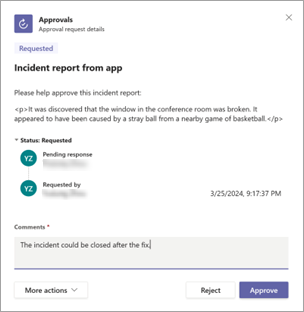
Keep the outcome, decision time, reviewer role and any conditions with the record. Microsoft’s example shows an approval request in the Approvals app; your process should also explain where the durable decision record belongs. Do not rely on a screenshot in a chat thread as the only record.
Define conditional approval
If a reviewer says “approved once the owner confirms the date”, the condition is still work to do. Decide how the system represents that state. A simple approved/rejected field may be insufficient for the process; avoid squeezing unresolved conditions into a green status without a follow-up owner.
Check access and retention
The people performing the next step need access to the relevant decision, while unnecessary private comments should remain restricted. Follow the organisation’s retention rules for operational records. When testing, use sample requests and confirm that a normal user can understand the outcome without opening the flow designer.
Working template
Decision record
Request and version:
Decision requested:
Outcome:
Reviewer role and time:
Conditions still outstanding:
Next action and owner:
Link to supporting context:
Illustrative starting point. Adapt it to your inputs, permissions and review process.
Before you use it
- The approved version is identifiable.
- Conditions are not lost.
- The next owner can see the decision.
- The record is retained appropriately.