Team Operations
A task title alone rarely gives the next person enough information. A useful automated task preserves the request reference, the required action and a route back to the original.
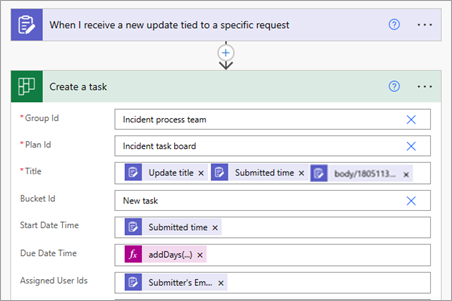
Decide which updates become tasks
Not every status update needs a new task. Define a qualifying condition such as a reported blocker that requires a named follow-up. If the rule is unclear, review submissions manually first. Otherwise a successful connection can flood the board with items nobody intends to work on.
Map the minimum useful context
Use a concise title, a stable request reference and a description explaining the next action. Microsoft documents creating a Planner task from an Updates submission and adding task details. Check the actual fields available in your environment; product plans and organisation settings can affect the workflow you can build.
Handle ownership deliberately
Do not assign a task to the submitter merely because their account is easy to obtain. The person reporting an issue may not be the person who can resolve it. Use a reviewed ownership rule and a fallback queue for cases that do not match. Avoid silently picking the first person in a list.
Check the board after a test submission
Confirm that the task has the correct title, bucket, owner and source link. Open it as a normal intended user where practical. Test a second submission and a repeated submission to see whether the process creates unnecessary duplicates. Keep the source reference in the task so a reviewer can recognise a repeat.
Working template
Task title: [Request ID] — [action in plain language]
Description: What happened; what is needed next; relevant constraint
Source: Link to the original update
Owner rule: [approved routing rule]
Fallback: Unassigned review queue with a named coordinator
Duplicate check: Search or record the source submission reference
Illustrative starting point. Adapt it to your inputs, permissions and review process.
Before you use it
- Only actionable updates create tasks.
- The next owner is appropriate.
- The original record is linked.
- Repeated submissions have a defined treatment.