Data Hygiene
A spreadsheet used by an automation needs a stable structure. Clear columns and consistent values matter more than a polished dashboard at the start.
Choose one row per event
Decide whether a row represents a request, an update or a task. Mixing those units makes reporting unreliable. A weekly status update is a new event even if the project is unchanged. Include a stable project reference and a submission reference so the relationship is visible without overwriting earlier history.
Define fields before formatting
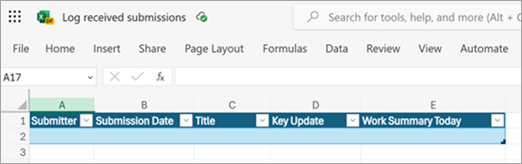
A small intake table might contain submission ID, received time, project ID, status, owner and source link. Give each field a short definition and decide which values are allowed. Avoid relying on cell colour to carry status. Microsoft’s documented Updates example prepares an Excel table before connecting the submission data.
Make missing information visible
Use a deliberate representation for an unknown owner or absent due date. An empty cell should not mean both “not applicable” and “someone forgot”. If an input is required for routing, send the item for clarification rather than letting later steps guess. Keep free-text notes separate from fields used to make decisions.
Protect the structure through ordinary governance
Tell contributors which columns the flow depends on. Review changes to headers and table names before applying them. Keep access appropriate for the information stored, and test with non-sensitive sample rows. A spreadsheet may be enough for a small workflow, but reconsider the design when concurrent changes, permissions or volume make it fragile.
Working template
Suggested columns
submission_id: Unique reference for this event
received_at: Timestamp with a documented timezone
project_id: Stable project reference
status: One of the agreed status values
owner: Responsible role or explicit “unassigned”
source_url: Link to the original submission
review_state: Pending / reviewed / needs clarification
Illustrative starting point. Adapt it to your inputs, permissions and review process.
Before you use it
- One row has one clear meaning.
- Routing values are consistent.
- Missing data has a defined treatment.
- Structural changes are reviewed.