Automation Reliability
Retrying can help with a temporary failure, but it can also repeat a side effect. Before enabling retries, ask whether the action might already have succeeded.
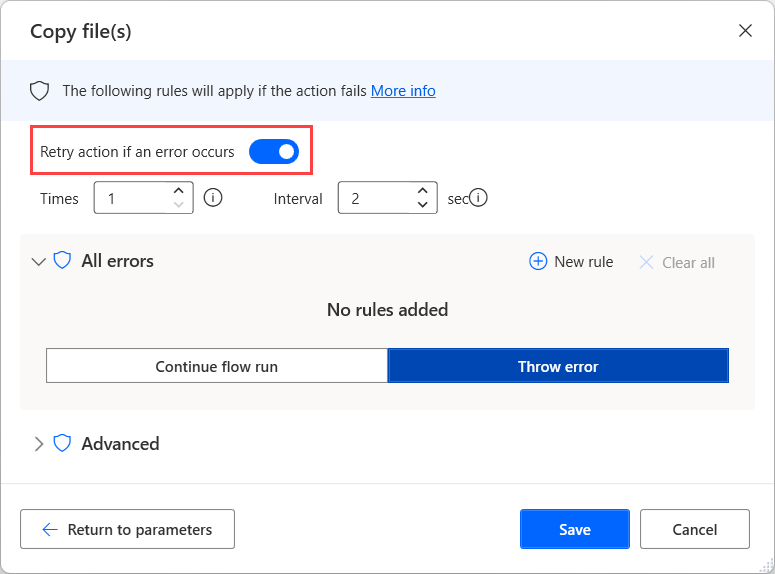
Identify the failure you expect
A temporary unavailable window is different from a wrong file path or invalid credential. Retrying the latter without changing anything may only waste time. Microsoft documents per-action retry settings for desktop flows, including an attempt count and interval. Choose them for a known transient condition rather than as a blanket fix.
Look for an ambiguous outcome
An action can create a record and then fail while returning confirmation. Repeating it may create another record. Check whether the target system exposes a stable request reference or another way to detect prior completion. If it does not, stop for review instead of assuming that an error means nothing happened.
Use a bounded recovery plan
Set a small, justified retry limit and a delay appropriate to the temporary condition. Define what happens after the limit: stop, collect a useful error record and alert the responsible owner. Endless retries can hide a broken process and make it harder to identify the first failure.
Test the failure path
Use sample data and deliberately exercise a safe failure condition. Inspect both the run result and the target application for duplicate effects. Record what was retried and what a human should check before restarting. Do not use real payments, customer messages or other consequential actions as casual retry experiments.
Working template
Before retrying
1. Classify the error: transient or needs intervention?
2. Check whether the target action already completed.
3. Reuse a stable request reference where supported.
4. Limit attempts and record the final outcome.
5. Escalate ambiguous results for review.
Illustrative starting point. Adapt it to your inputs, permissions and review process.
Before you use it
- The failure is plausibly temporary.
- Partial completion is considered.
- Attempts are bounded.
- The target system is checked for duplicate effects.