Workflow Design
A busy automation is not necessarily a useful one. Sample the records it creates and ask whether the receiving person still needs to repair them.
Choose an outcome worth checking
For an intake flow, a usable record may require the correct project reference, owner, source link and review state. Define that standard with the person who receives the work. Run count alone tells you activity, not whether the process became easier.
Sample a manageable set
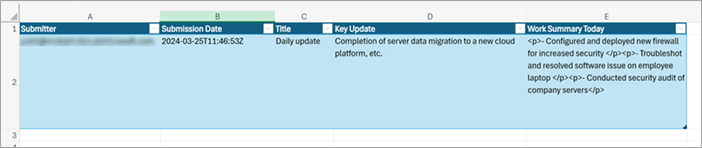
Review a small selection of recent outputs, including normal and exceptional cases. Compare them with the original submissions. The Excel screenshot here comes from Microsoft’s documented update-sync example; it illustrates the destination record you should inspect, not measured results from our own deployment.
Record repairs and uncertainty
Note missing fields, duplicate rows, incorrect routing and manual clarifications. Distinguish a software mapping error from an ambiguous intake question. If you estimate time saved, explain the baseline and include maintenance and correction time. Avoid precise productivity claims built from a single convenient example.
Choose one improvement
Fix the most consequential recurring issue, then repeat the same output check. Keep a short change record so improvements can be connected to evidence. If the process is rarely used or costs more to maintain than it saves, simplifying or retiring it may be the right outcome.
Working template
Weekly output review
Sample period and selection method:
Records checked:
Usable without correction:
Common repair needed:
Duplicate or misrouted items:
One change to try:
Date and criteria for the next review:
Illustrative starting point. Adapt it to your inputs, permissions and review process.
Before you use it
- Success is defined as a usable result.
- Samples include exceptions.
- Maintenance effort is counted.
- Changes are tied to observed problems.