Team Operations
An automatic email should tell the recipient what changed and whether action is needed. Repeating every submitted field can turn a useful signal into background noise.
Choose a reason to interrupt someone
Decide which updates need immediate attention and which can wait for a routine review. A blocked delivery may justify a notification; a normal weekly status may not. Keep the rule explicit so people know why a message arrived. The first version can be a manual decision while you learn what deserves automation.
Use a stable message structure
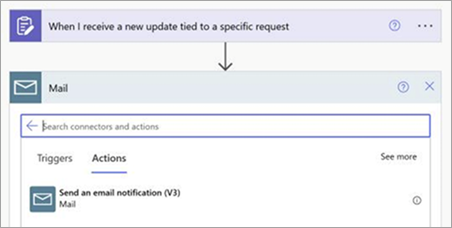
A practical message contains the project or request reference, the change, the next owner and a link to the source record. Microsoft documents an Updates-to-email flow using an email action. Treat that as the connection pattern; you still need to decide which fields are appropriate for your audience and permissions.
Keep sensitive detail at the source
Do not copy confidential notes into a broad distribution list merely because they are available as dynamic content. Prefer a short summary and a link to a record that enforces the right access. Check that the recipient can actually open the link. A broken link often creates a second manual conversation instead of saving one.
Run a quiet pilot
Use a small test audience and clearly labelled sample submissions. Check the subject line on mobile, missing values and the reply destination. Ask recipients whether they understood the expected action. Before expanding, decide how to stop the flow and how to handle messages that were sent twice.
Working template
Subject: [Project ID] needs a decision: [short blocker]
Changed: [one-sentence update]
Action needed: [specific decision or review]
Owner: [named role]
Source record: [permission-checked link]
If no action is needed, consider placing the update in the regular digest.
Illustrative starting point. Adapt it to your inputs, permissions and review process.
Before you use it
- The interruption has a reason.
- The next action is obvious.
- The recipient can open the record.
- Private fields are not copied unnecessarily.