Data Hygiene
Connecting a submission to a spreadsheet is a mapping problem before it is a reporting problem. Write down how each input becomes a row value.
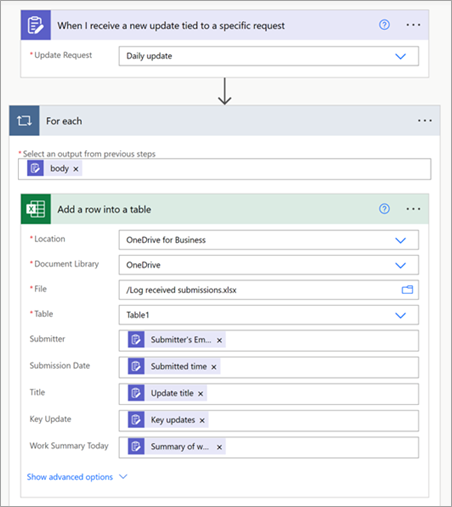
Create a field map
List each destination column, its source field and any transformation. Include timestamp interpretation and allowed status values. Microsoft’s Updates tutorial shows a flow that adds submission information to an Excel table. Use the documented pattern as a starting point, then verify your own field choices.
Keep identifiers as identifiers
A project reference with leading zeroes should not accidentally become a number with those zeroes removed. Decide which values are text, dates or numeric measurements. Check the actual saved row after a test; the flow editor’s display is not the final evidence.
Test missing and unexpected values
Include an empty optional note, an unknown status and a long description in your sample set. Decide whether the row should be rejected, flagged or accepted with a visible placeholder. Do not silently shorten a field if that would remove information someone needs to review the request.
Plan for change
When a form field is renamed or removed, review the map before relying on the next run. Keep a small example row with expected values so a maintainer can repeat the check. If the spreadsheet becomes a critical operational record, review whether its access controls and editing patterns still fit the job.
Working template
Destination | Source | Rule
submission_id | Submission reference | Preserve as text
received_at | Submission time | Document timezone
status | Status answer | Validate against allowed values
source_url | Original record link | Verify access
review_state | Workflow state | Start as pending
Illustrative starting point. Adapt it to your inputs, permissions and review process.
Before you use it
- Every column has a defined source.
- Identifiers retain their formatting.
- Edge cases were tested.
- The saved row matches the field map.